
How to Build a Website from Scratch in 2026: Step-by-Step Beginner's Guide
You do not need to know how to code to build a professional website in 2026 — but knowing your options makes all the difference. This step-by-step guide walks through every decision: domain, hosting, platform, design, SEO basics, and how to go live without wasting money on things you do not need.
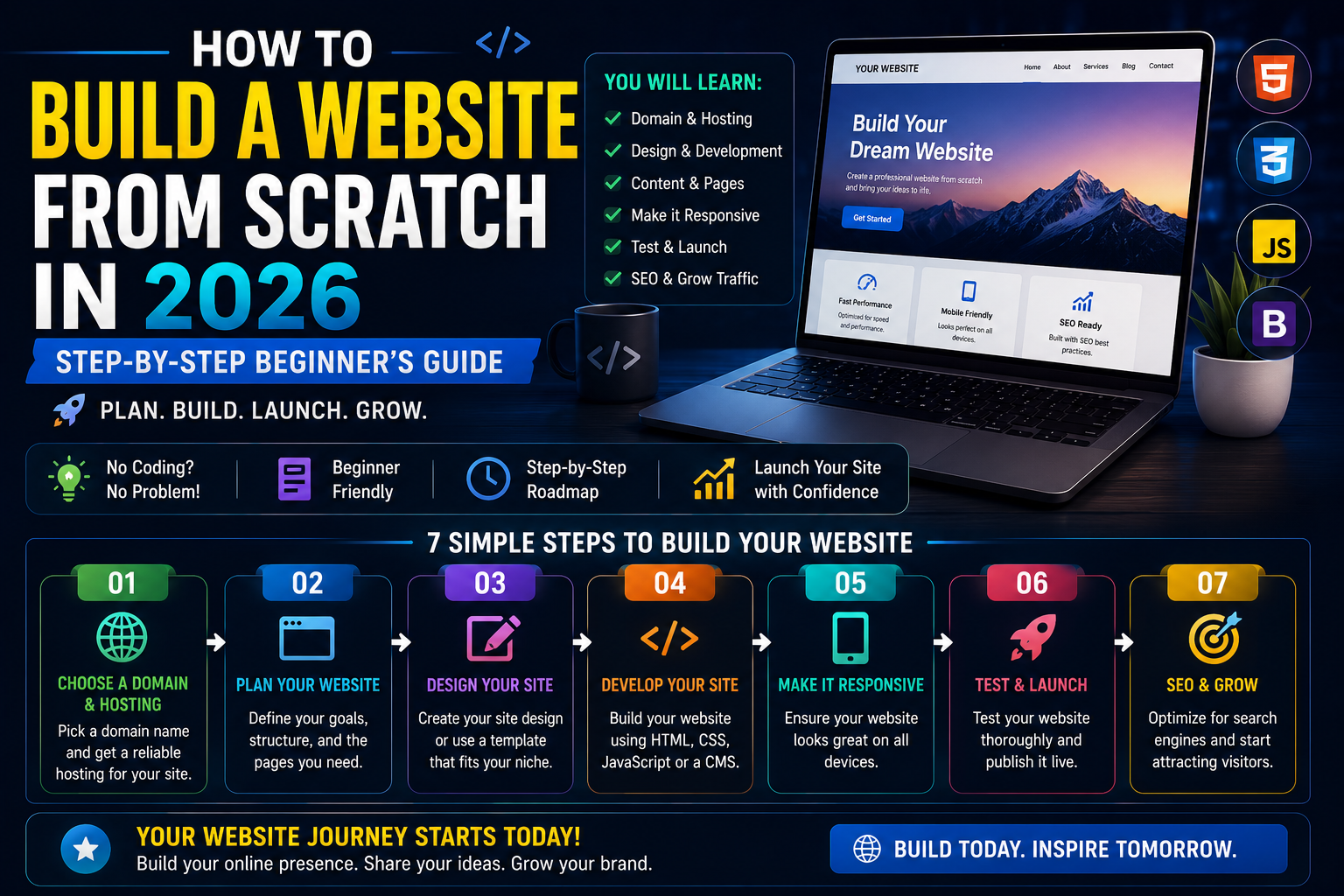
In 2026, building a website is genuinely accessible to anyone. The barriers that once made website creation the exclusive territory of developers have largely dissolved — there are tools that let you build a professional site without writing a single line of code, and there is enough freely available knowledge to learn to build one with code in a few months if that is your goal.
What has not changed is that making the wrong choices early — the wrong platform, the wrong hosting provider, the wrong structure — creates problems that are expensive and time-consuming to fix later. This guide walks you through every decision in the right order, so you build something solid from the start rather than rebuilding it six months in.
Before You Start: Answer These 3 Questions
Before you buy a domain or choose a platform, answer these three questions honestly — the answers determine everything that follows:
- Who will visit this website? A personal portfolio visited by recruiters needs different tools than an e-commerce store visited by customers.
- What do you want visitors to do? Read your blog, contact you, buy a product, book an appointment, or download something? Each action requires a different setup.
- How often will the content change? A website updated daily needs a CMS. A one-page business card site can be static HTML.
The most common and expensive mistake beginners make is choosing a platform based on what they have heard about rather than what their specific use case actually requires. Spend ten minutes on these questions before spending a single rupee.
Step 1 — Choose and Register Your Domain Name
Your domain name is your address on the internet. Choose it carefully because changing it later is painful — you lose all the SEO authority you have built, and you have to update every link, social profile, and business card that carries the old address. Here are the rules that matter:
- Keep it short. Under 15 characters is the target. Shorter domains are easier to remember, easier to type on mobile, and less prone to spelling mistakes.
- Make it easy to spell out loud. If you have to spell it letter by letter whenever you tell someone your website address, reconsider the name.
- Use .com if possible. For an Indian audience, .in is also credible and often significantly cheaper. Avoid obscure extensions like .xyz for general business or personal websites.
- Avoid hyphens and numbers. They create confusion in verbal communication and reduce memorability.
- Check social media availability. Your domain name should ideally be available as a username on Instagram, X, and YouTube before you commit to it — consistent branding across platforms matters.
| Domain Registrar | .com Price (Per Year) | .in Price (Per Year) | Free SSL |
|---|---|---|---|
| Namecheap | ₹900 – ₹1,200 | ₹600 – ₹900 | ✅ Yes |
| Hostinger | ₹800 – ₹1,100 | ₹500 – ₹800 | ✅ Yes |
| GoDaddy | ₹900 – ₹2,000 | ₹700 – ₹1,500 | ✅ Yes |
| BigRock | ₹799 – ₹999 | ₹399 – ₹699 | ✅ Yes |
Important: Always register your domain separately from your hosting. It gives you the flexibility to switch hosting providers in the future without losing control of your domain.
Step 2 — Choose the Right Web Hosting
Web hosting is the server where your website's files live and are served to visitors. Choosing the wrong type wastes money or limits performance. Here is how the main hosting types compare in 2026:
| Hosting Type | Best For | Price (India/month) | Examples |
|---|---|---|---|
| Shared Hosting | New websites, low traffic, beginners | ₹69 – ₹299 | Hostinger, Bluehost, SiteGround |
| VPS Hosting | Growing sites, medium traffic | ₹500 – ₹2,000 | DigitalOcean, Linode, Hetzner |
| Managed WordPress | WordPress sites, no server management | ₹800 – ₹3,000 | Kinsta, WP Engine |
| Cloud / Serverless | Next.js, React apps, modern web apps | Free – ₹2,000 | Vercel, Netlify, Cloudflare Pages |
| Free Hosting | Testing, portfolios, hobby projects | ₹0 | Vercel, GitHub Pages, Netlify |
For most beginners building their first website in India, Hostinger's shared hosting (typically ₹69 to ₹149/month on a long-term plan) is the most practical starting point — affordable, reliable, and includes a one-click WordPress installer. If you are building a Next.js or React-based site, Vercel's free plan is the most efficient starting point, with enterprise-grade infrastructure at zero cost for low-traffic sites.
Step 3 — Choose Your Website Platform
Your platform determines how you build and manage your website every day. The right choice depends entirely on your technical comfort level and what your website needs to do:
| Platform | Best For | Skill Required | Monthly Cost |
|---|---|---|---|
| WordPress.org | Blogs, business sites, e-commerce | Low (with page builders) | Free + hosting cost |
| Wix | Simple business sites, portfolios | Zero — drag and drop | ₹170 – ₹2,000 |
| Shopify | E-commerce, online stores | Low | $29 – $299 |
| Webflow | Design-heavy sites, agencies | Medium | $14 – $39 |
| Ghost | Blogging, paid newsletters | Low | $9 (Ghost Pro) |
| Next.js (coded) | Web apps, full-stack sites | High (JavaScript) | Free (hosting only) |
For most beginners in India who want a blog or business website with strong long-term SEO potential, WordPress.org with Hostinger hosting is the most practical recommendation in 2026. It has the largest ecosystem of plugins and themes, the most tutorials available in Hindi and English, and skills that transfer to hundreds of thousands of other websites. Wix is faster to set up but more limited in SEO and harder to migrate away from later.
Step 4 — Design Your Website
Design does not mean spending weeks perfecting visuals before a single page goes live. It means making four decisions quickly and moving forward:
- Choose a theme. On WordPress, themes like Astra and GeneratePress are fast, lightweight, and SEO-friendly. Both have free versions that are genuinely capable. On Wix and Webflow, use the platform's own templates as your starting point.
- Set your colour palette. Two to three colours is enough. Consistency matters more than sophistication. Use a free tool like Coolors.co to find combinations that work.
- Pick two fonts maximum. One for headings, one for body text. Google Fonts has hundreds of free options. Clarity beats creativity for most websites.
- Use real images. Canva AI can generate original images for your website for free. Authentic images of you, your product, or your work consistently outperform generic stock photography on both user engagement and conversion metrics.
Step 5 — Create the Essential Pages Before Going Live
Every website needs these pages in place before it is published. Without them, visitors leave confused and search engines do not fully trust the site:
- Home page: A clear headline that tells visitors exactly what the site is about in one sentence, visible without scrolling.
- About page: Who you are, why you created this website, and why the visitor should trust you. Personal details and a real photograph increase trust significantly.
- Contact page: A contact form or email address. Never make it difficult for someone to reach you.
- Privacy Policy: Required for Google AdSense, any tracking tools, and most affiliate programs. Free generators at Termsfeed.com cover most use cases in minutes.
- Disclaimer / Terms of Service: Important if your site includes advice, product recommendations, or affiliate links.
Step 6 — Set Up SEO From Day One
SEO is not something you add after your website is built — it is something you configure correctly from the beginning. Every day your website is live without proper SEO setup is a day of wasted potential traffic. On WordPress, install Rank Math or Yoast SEO immediately after setup. Both walk you through the essential technical configuration: site title, meta description, XML sitemap, robots.txt, and structured data markup.
Then complete these three free steps before publishing your first post:
- Connect to Google Search Console (free) — tells Google your site exists and helps it find your pages faster
- Connect to Google Analytics 4 (free) — tracks every visitor from day one so you have historical data as you grow
- Submit your XML sitemap to Google Search Console — your SEO plugin generates this automatically
What Does It Actually Cost to Build a Website in India in 2026?
| Website Type | DIY Cost (Per Year) | Professional Agency Cost |
|---|---|---|
| Basic blog or portfolio | ₹2,000 – ₹5,000 | ₹15,000 – ₹40,000 |
| Business website (5–10 pages) | ₹5,000 – ₹15,000 | ₹30,000 – ₹1,00,000 |
| E-commerce store | ₹10,000 – ₹30,000 | ₹50,000 – ₹3,00,000 |
| Web application | Depends on hosting scale | ₹1,00,000 – ₹10,00,000+ |
The cheapest possible approach in India: Hostinger shared hosting from ₹69/month, a free Astra theme on WordPress, free Canva images, and Google's free SEO and analytics tools. Total annual cost for a fully functional website: approximately ₹800 to ₹2,000 per year excluding your domain name.
Website Launch Checklist
Before you click publish, run through this list:
- ✅ Domain registered and pointing to your hosting
- ✅ SSL certificate active (padlock visible in browser)
- ✅ Home, About, Contact, Privacy Policy pages published
- ✅ Mobile view tested on a real phone
- ✅ Page speed tested at PageSpeed Insights
- ✅ Google Search Console connected and sitemap submitted
- ✅ Google Analytics 4 connected and tracking confirmed
- ✅ SEO plugin configured with site title and meta description
- ✅ Social media accounts created with same username as domain
- ✅ Contact form tested — make sure messages are reaching your email
Frequently Asked Questions
How long does it take to build a website in 2026?
A simple blog or portfolio can be built and live within one to three days using WordPress and a modern theme. A full business website with multiple pages typically takes one to two weeks for a beginner working part-time. A custom web application built with code takes weeks to months depending on the complexity of the features.
Do I need to know coding to build a website in 2026?
No. WordPress with a page builder like Elementor, Wix, and Webflow all allow you to build professional websites without writing any code. However, basic HTML and CSS knowledge makes customisation faster and gives you more control over the final result. It is worth learning the basics even if you use a no-code platform.
Which is better — WordPress or Wix in 2026?
WordPress is better for SEO flexibility, long-term scalability, plugin ecosystem, and full ownership of your platform. Wix is better for pure simplicity and speed of initial setup. For anyone planning to grow organic search traffic through blogging or content marketing, WordPress is the stronger long-term choice. For a simple one-page business site with no SEO goals, Wix is perfectly adequate.
What is the cheapest way to build a website in India in 2026?
Hostinger shared hosting starting at ₹69/month with a free WordPress install, a free Astra or GeneratePress theme, free Canva visuals, and Google's free analytics and search tools. Total first-year cost including a domain name: approximately ₹2,000 to ₹4,000 for a complete, professional website.
How do I get traffic to my new website?
The three most effective free traffic sources for a new website in 2026 are SEO (publishing keyword-targeted content consistently), social media sharing (especially Pinterest for blogs and Instagram for visual businesses), and WhatsApp sharing within your existing network. Paid traffic through Google Ads or Meta Ads can accelerate growth once you have a page that converts visitors into customers or subscribers.
Sources: WordPress.org | Hostinger India | Rank Math SEO | Google PageSpeed Insights | Google Search Console
Comments
0Be the first to leave a comment.